
 /
/
What You Get
SciTeX Cloud is a self-hostable research platform.
One make start gives you a full Django application with:
- Scholar — Literature search across CrossRef, PubMed, arXiv, and OpenAlex. BibTeX management and citation tracking.
- Writer — LaTeX manuscript editor with BibTeX integration, figure/table management, and IMRAD templates.
- Vis — Data visualization and interactive figure editing.
- Console — Web-based terminal for running Python and Bash in isolated containers.
-
Hub — Project file browser with GitHub-style
/username/project/URLs. - Research Tools — Statistics, PDF manipulation, citation scraping, QR generation, and more at /tools/.
- MCP Server — 23 tools for AI agents (Claude, Cursor, etc.) to search literature, manage citations, generate figures, and run statistics.
Ecosystem Overview
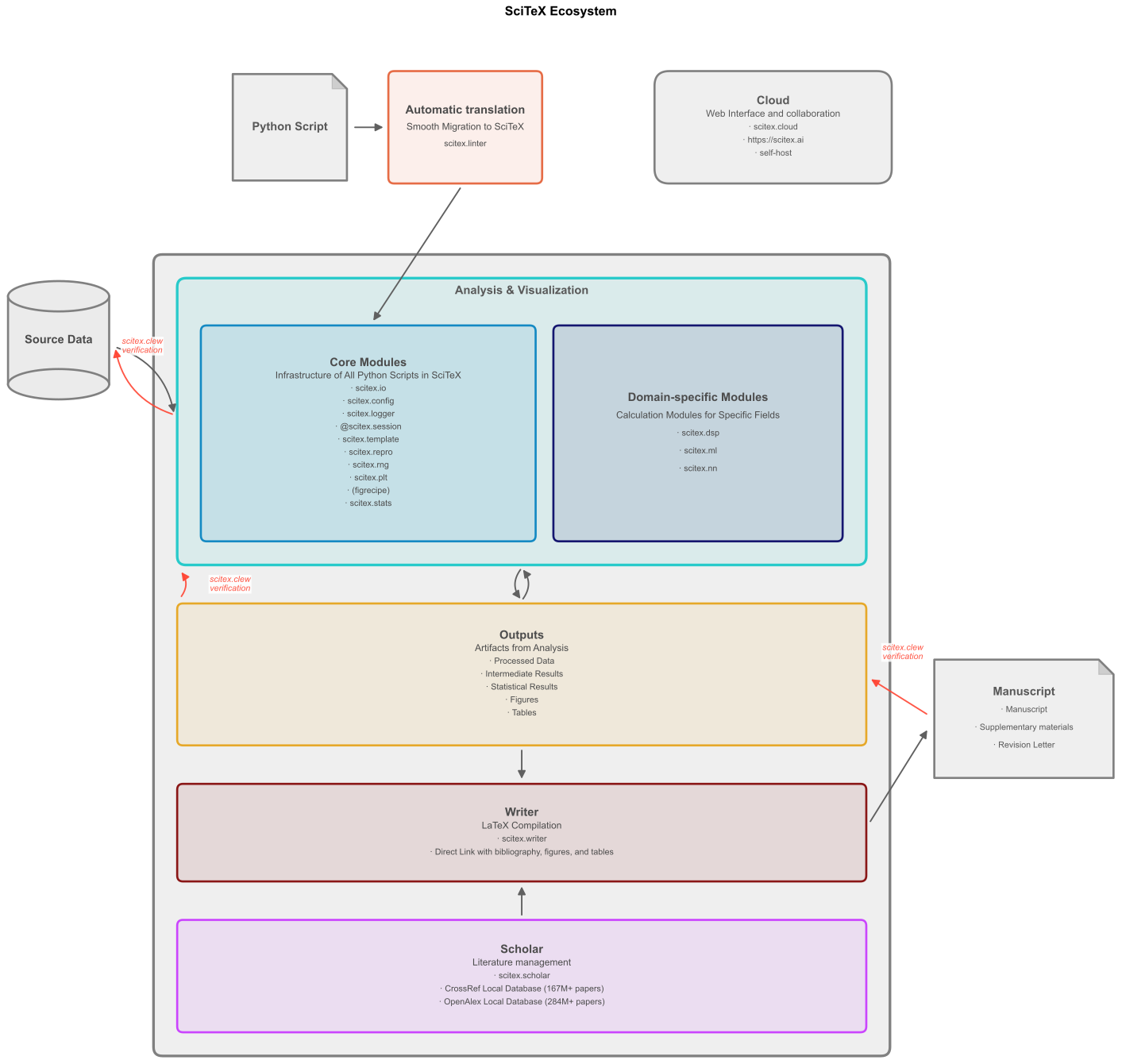
Architecture
Docker containers, fully orchestrated:
- Django (port 8000) — Web application and REST API
- PostgreSQL — Database for all application data
- Redis — Cache and Celery message broker
- Gitea (port 3000) — Self-hosted Git server for project repositories
- Celery — Async task workers for background jobs
- Umami (port 3300) — Privacy-focused analytics (no external tracking)
Optional local databases for offline paper search:
- CrossRef Local — 167M+ papers in a local SQLite database. Fast, offline metadata search with citation graph analysis.
- OpenAlex Local — 284M+ scholarly works with full-text search, abstracts, and impact factors.
Infrastructure Deployment
Complete infrastructure stack showing Docker services, host services, and network architecture.

Quick Start
Three commands to get everything running:
git clone https://github.com/ywatanabe1989/scitex-cloud.git
cd scitex-cloud
make start
Access at localhost:8000.
Test user: test-user / Password123!
Prerequisites
- Linux, macOS, or Windows (WSL2)
- Docker 24.0+ with Docker Compose v2
- Git 2.30+
- 4 GB RAM minimum (8 GB recommended)
Development Setup
-
Clone and configure
git clone https://github.com/ywatanabe1989/scitex-cloud.git cd scitex-cloud cp deployment/docker/envs/.env.example deployment/docker/envs/.env.dev -
Set secret key (edit
.env.dev)SCITEX_CLOUD_DJANGO_SECRET_KEY=$(python3 -c 'import secrets; print(secrets.token_urlsafe(32))') SCITEX_CLOUD_POSTGRES_PASSWORD=your-dev-password -
Start services
make start
make status
Production Setup
For deploying on a home server, NAS, or VPS:
-
Create production environment
cp deployment/docker/envs/.env.example deployment/docker/envs/.env.prod -
Configure for production (edit
.env.prod)DEBUG=False SCITEX_CLOUD_DOMAIN=scitex.example.com SCITEX_CLOUD_SITE_URL=https://scitex.example.com SCITEX_CLOUD_ENABLE_SSL_REDIRECT=true -
Start production
make ENV=prod start
make ENV=prod status
CLI-Only Install
Use the CLI and MCP server without Docker:
pip install scitex-cloud              # CLI only
pip install scitex-cloud[mcp]         # CLI + MCP server
pip install scitex-cloud[all]         # Everything

scitex-cloud --version
scitex-cloud --help
MCP Server for AI Agents
Connect AI assistants (Claude, Cursor, etc.) to your SciTeX instance:
scitex-cloud mcp start                # Start MCP server
scitex-cloud mcp doctor               # Diagnose setup
scitex-cloud mcp installation          # Client config
Common Commands
make start                    # Start development
make stop                     # Stop all services
make restart                  # Restart services
make status                   # Health check
make logs                     # View all logs
make ENV=prod start           # Start production
make help                     # All available commands
Full Documentation
For configuration reference, troubleshooting, and architecture details, see the full setup guide on Read the Docs.